
Step-by-step guide · 6 min read
How to Scan Sports Cards for Value on Your iPhone
· By the Sports Card Value Scanner team
Quick answer
To scan sports cards for value, use an app to scan sports cards for value such as Sports Card Value Scanner. Open the scanner, line the front of the card up inside the frame and take the photo, or pick one from your gallery. In seconds the app identifies the card and shows a reference price range, estimated eBay values and a rarity score out of 10.
Scanning a sports card for value takes about as long as taking a photo. You open a card scanner app, frame the front of the card so all four edges sit inside the on-screen guides, and take the picture. The app matches the image against known cards and returns the card's name, year and set, plus a value estimate. In Sports Card Value Scanner that means a reference price range, estimated eBay values and a rarity score out of 10. The result is a starting point, not an appraisal. Condition, grading and the exact parallel move real prices, so a card that scans as valuable deserves a second check against recent sold listings before you sell it. With a stack of cards, sort first and scan the oldest cards, rookies and anything shiny or numbered before the commons.
| Devices | iPhone and iPad with iOS 15.1 or later, Apple silicon Macs, and Android |
|---|---|
| Input | A camera photo of the card front, or a photo from your gallery |
| What you get | Card name, year and set, a reference price range, estimated eBay values and a rarity score out of 10 |
| Saving | Save to Collection stores the card, its value range and the scan date |
| Price | Free to download, with optional Premium in-app purchases |
What do you need to scan sports cards for value?
You need an iPhone or iPad on iOS 15.1 or later, or an Android device, plus the Sports Card Value Scanner app, the card laid flat and even light.
- An iPhone running iOS 15.1 or later, an iPad running iPadOS 15.1 or later, or an Android phone or tablet.
- The Sports Card Value Scanner app. It's free to download on the App Store and Google Play.
- Your card, laid flat on a plain surface. If glare from a top-loader hides the details, take the card out or tilt it.
- Even light. Daylight from a window or a bright room works better than a single overhead bulb.
How do you scan sports cards on iPhone, step by step?
Here's how to scan sports cards on iPhone: open the scanner, frame the front of the card inside the guides, take the photo or pick one from your gallery, then read and save the result.
- 1
Open the scanner
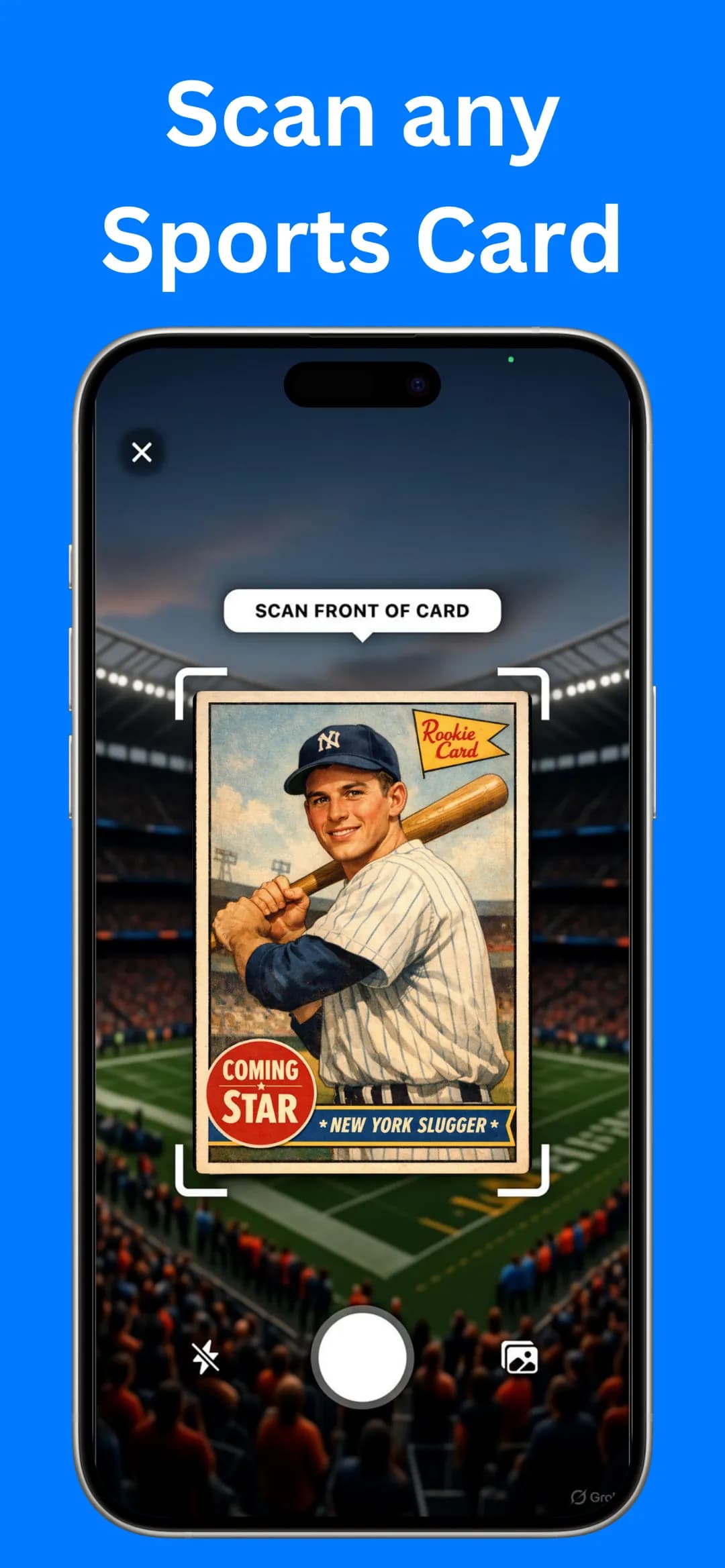
Launch Sports Card Value Scanner and tap the camera button. The scan screen opens with a Scan front of card prompt and four corner guides that show where the card should sit.
- 2
Frame the front of the card
Hold your phone parallel to the card so all four edges sit inside the guides. In a dim room, turn on the flash toggle. Keep your fingers away from the player's name and the card's design.
- 3
Take the photo or pick one from your gallery
Tap the shutter button. Already photographed your cards? Tap the gallery icon and choose an existing photo instead. That's handy for cards you've listed for sale or shared with friends.
- 4
Read the result
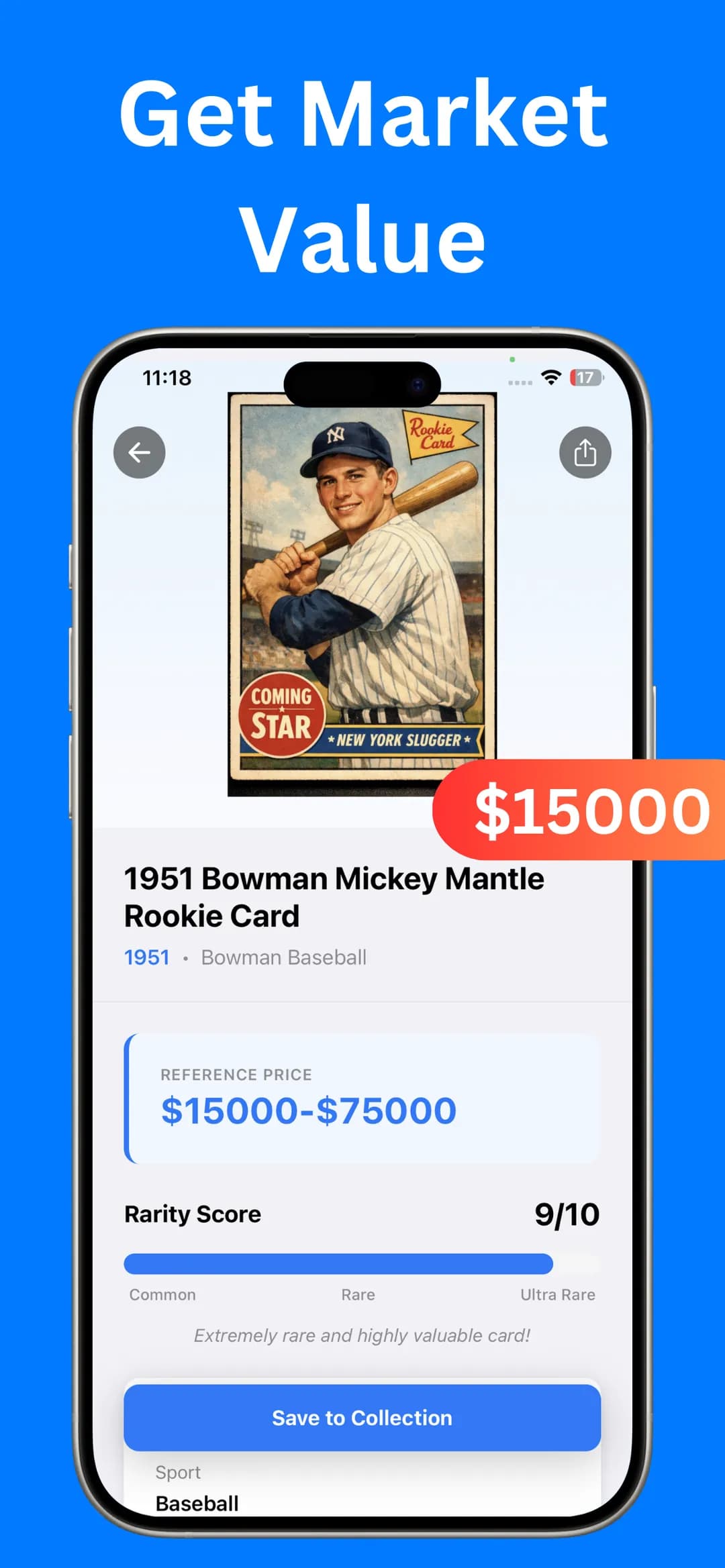
In seconds the app identifies the card and opens a result screen. You'll see the card name, year and set, a Reference Price range and a Rarity Score on a scale from Common to Ultra Rare.
- 5
Check the card information
Scroll down to Card Information for the sport, year issued, series and card number, followed by Value Details. Compare these with the back of your card to confirm the app matched the exact card you're holding.
- 6
Save it to your collection
Tap Save to Collection. The card, its value range and the date you scanned it are stored in My Collection, so you can come back to it later.
How do you get a clean scan?
Shoot the card flat and square in even light, avoid glare, fill the frame with the front of the card, and retake the photo if the result doesn't match the back.
- Shoot flat and square. Lay the card on a plain, dark surface and hold the phone directly above it so the card isn't distorted.
- Kill the glare. Chrome, refractor and foil cards reflect light. Tilt the card slightly or move away from overhead lights until the shine disappears.
- Fill the frame. Move close enough that the card fills the corner guides. Sharp details help the app tell similar cards apart.
- Scan the front. The scanner asks for the front of the card, where the player, brand logo and design are.
- Retake if something looks off. If the year or set in the result doesn't match the back of your card, take another photo in better light.
What does the value on the result screen mean?
The reference price is a range, not an offer. A card's real value is what a buyer pays, and that depends on condition, grading, the exact parallel and timing. Treat the app's figure as an estimated starting point. If a card scans as rare or valuable, check recent sold listings before you sell, trade or insure it. Our guide on how to price sports cards on eBay walks through that process.
The rarity score helps you sort a stack quickly. Cards near the Ultra Rare end of the scale are the ones worth sleeving, double-checking and researching further. For the full checklist, read how to tell if a sports card is valuable.
How do you scan a whole stack of cards quickly?
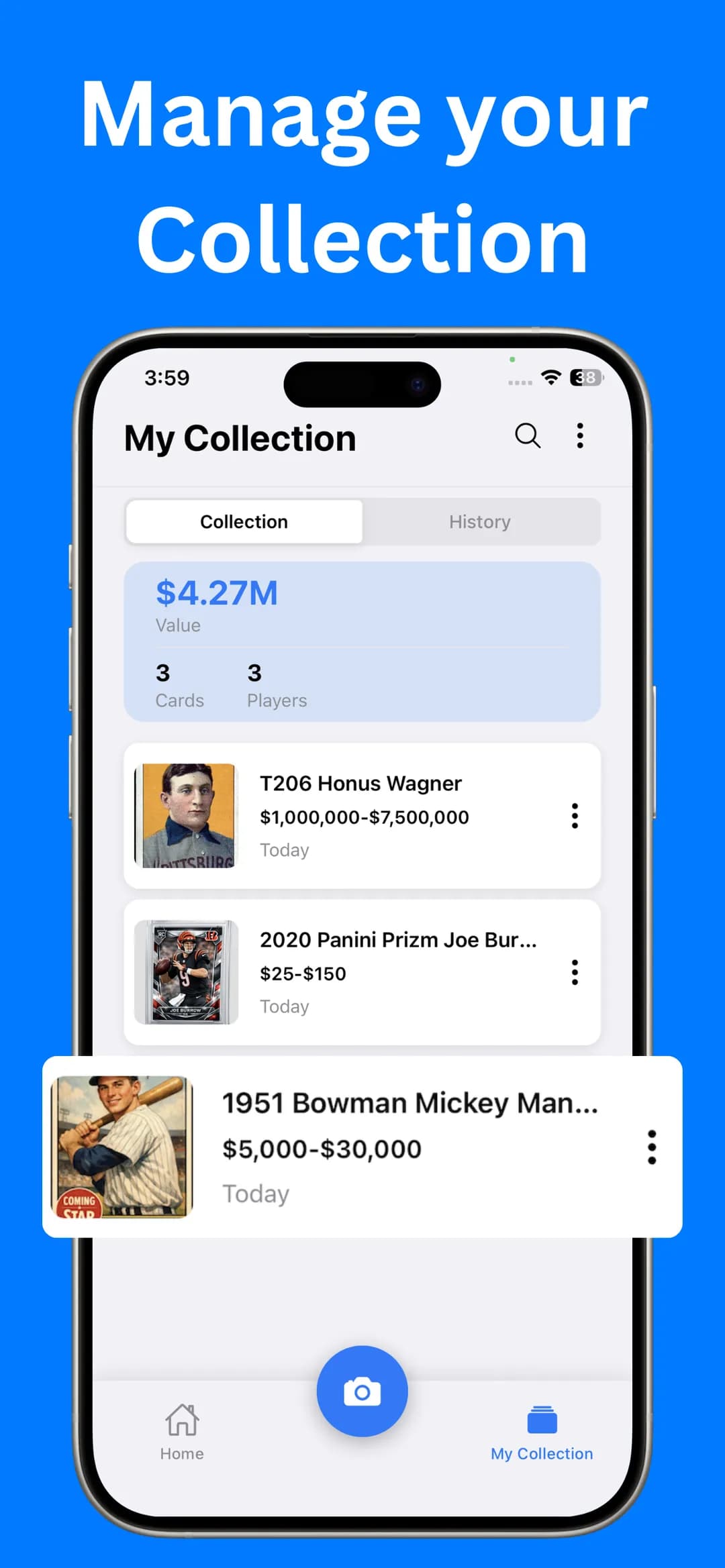
Sort the stack by sport, then by year, before you start, since you scan one card at a time. Scan the oldest cards, the rookies and anything shiny or numbered first, because those are the most likely to be worth something. Save the keepers to your collection as you go. My Collection then shows the total value, the number of cards and the number of players you've saved.
Sports Card Value Scanner is free to download. Optional Premium unlocks unlimited identifications, an ad-free experience and faster results, which helps if you're working through a big box.
Does it work for baseball, basketball and football cards?
Yes. The scanner handles cards from all sports and eras, including baseball, basketball, football and other sports cards. For sport-specific advice on what drives value, see our guides to baseball card values, football card values and basketball card values. If you're new to reading card backs, start with how to identify sports cards.
Frequently asked questions
Can I scan sports cards for value for free?
Sports Card Value Scanner is free to download from the App Store and Google Play. Optional Premium in-app purchases add unlimited identifications, an ad-free experience and faster results.
Can I scan a card from a photo I already took?
Yes. Tap the gallery icon on the scan screen and choose a photo from your library instead of using the camera.
Do I need to take the card out of its sleeve?
Not always. A thin penny sleeve usually isn't a problem. If glare or scratches on a top-loader hide the card's details, take the card out or tilt it until the reflection disappears.
Sources

Find out what your cards are worth
Scan your first card in seconds. Get the card details, a reference price range and a rarity score, then build a collection you can track.


4.5★ App Store (75) · 4.4★ Google Play (79) · Free to download